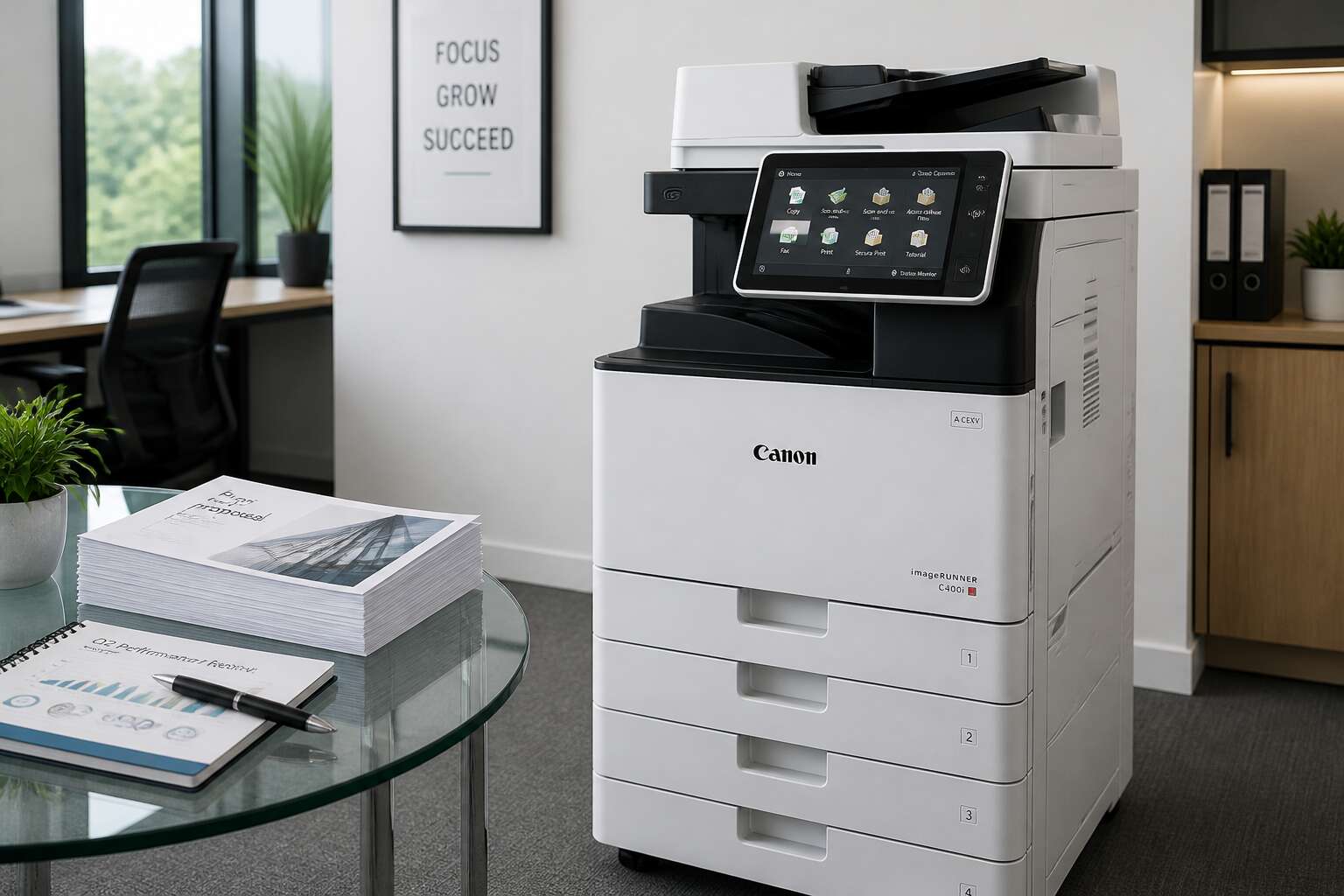
Core Features of the Canon 400i
High-Speed Printing and Copying
The canon 400i photocopier prints and copies at forty pages per minute, and it keeps that pace whether you are producing client contracts or internal memos. Warm-up time is short, so the first page appears almost as quickly as the hundredth. That consistency matters in a busy South African office where one machine has to serve the whole team.
The core features support that speed.
- Dual scanning reads both sides of a page in a single pass.
- Staple and hole punch finishing runs without interrupting the print queue.
- A tilting touch panel adjusts to the height of the person using it.
These tools keep long copying jobs moving. The machine holds its speed under steady use, which is what buyers notice after hours of continuous printing. Speed alone is not the point; it is speed that stays reliable when the workload never stops.
Advanced Scanning Capabilities
Nobody enjoys watching a scanner process a large stack of paper. The canon 400i photocopier solves that with scanning features that operate without supervision.
It removes background shadows, straightens crooked pages, and skips blank sheets automatically. The device offers several output options.
- Searchable PDFs for quick text lookup
- JPEG and TIFF formats for image editing
- Automatic orientation for mixed document stacks
The final files stay clean and organized. You spend less time fixing scans and more time using them.
Paper Capacity and Handling Options
In a busy South African office, the paper tray is the true test of a copier’s mettle. The canon 400i photocopier handles this with a robust paper capacity that suits demanding workloads. The main tray holds substantial reams, while the bypass slot takes envelopes and thicker stock without fuss. Routine refills are quick, and the clearance path is straightforward, reducing downtime.
The device manages paper types through a control panel that remembers your settings. Many professionals here juggle multiple jobs in one afternoon:
- Letterhead and bond paper for client correspondence
- Labels and cardstock for in-house printing tasks
- Recycled stock for internal drafts and memos
The canon 400i photocopier adjusts to each one without constant tweaking. You load the tray, confirm the size, and let the machine proceed. It is a small luxury when the clock is ticking.
User-Friendly Control Panel
Every minute spent hunting through a menu is a minute stolen from a client. The canon 400i photocopier control panel gives that time back with a layout that requires no translation. The home screen presents copy, scan, and print as clear icons, and the system remembers your last used settings. No reprogramming between jobs!
Here are the practical strengths I noticed during my first week:
- Daily tasks complete within three taps, not three pages of menus
- Shortcut keys allow you to program frequent jobs
- The display tilts to reduce glare from overhead lights
These details save time on a busy day. You focus on the stack of documents rather than the machine. The canon 400i photocopier does not slow you down.
Operational Benefits for Modern Workflows
Boosting Productivity in Small Teams
SEDA (Small Enterprise Development Agency) reports that small businesses account for roughly 60% of employment in South Africa. These teams rarely have spare hands, so operational efficiency becomes survival. The canon 400i photocopier addresses this need through workflow features that reduce wasted motion.
Its job memory stores frequently used settings for contracts, invoices, and client reports. Staff recall them with two taps, eliminating the need to reconfigure menus repeatedly.
Operational benefits include:
- Quiet operation suited to open plan offices
- Energy saving modes that respect load shedding schedules
- Automatic stapling and sorting of multi page documents
The canon 400i photocopier also accepts print jobs from mobile devices, letting a consultant send a proposal from Sandton and collect it at the office. Small teams gain back hours once lost to machine management.
Reducing Per-Page Costs
In an economy where every rand spent on office supplies is a rand not spent on growth, the canon 400i photocopier makes its case through arithmetic. Automatic duplex printing halves paper consumption without staff intervention. Toner economy modes stretch each cartridge further, which matters when consumables prices fluctuate with the exchange rate.
I have watched offices treat per-page costs as a fixed monthly mystery. They are not! The variables sit in plain sight:
- Paper waste from single-sided print jobs
- Toner replaced before the cartridge is truly empty
- Service calls caused by paper jams and misfeeds
- Energy consumed during peak tariff hours
The canon 400i photocopier addresses each variable. Its sensors flag a cartridge only when it is genuinely low, not merely unsettled. A jam-resistant paper path reduces the downtime that quietly inflates the true cost of every page, and load-shedding aware energy settings avoid expensive battery top-ups during outages.
Streamlining Document Workflows
Every office runs on documents, yet few realise how many hands a single page touches before it rests. A document arrives, gets printed, gets walked somewhere, gets scanned by someone else, gets filed twice. The canon 400i photocopier removes those redundancies from the process.
Documents move from the device to cloud folders, email addresses, or network drives with a single set of instructions saved as a profile. No one has to remember which setting goes where. The routine becomes automatic.
Consider a standard invoice cycle:
- Scan the invoice at the device.
- Route it to the accounts payable folder.
- Send a copy to the approver.
- Archive the original.
The canon 400i photocopier handles all of it while staff attend to other matters. The machine requires no further instruction. It simply carries out the sequence, and the workflow continues without interruption.
Maintenance, Troubleshooting, and Longevity
Routine Cleaning and Care
A neglected machine fails quietly, one missed copy at a time. Your canon 400i photocopier needs more than an annual visit from a technician. I once opened a unit and found the cooling vents choked with carpet fluff. The fix was a simple brush. Do that monthly.
Troubleshooting follows evidence, not habit. If the screen reports a jam and the paper path looks clear, open the side hatch. The canon 400i photocopier allows you to reach the feed rollers without any tool. A torn label hides there more often than you expect.
- Clear the paper path and reset the counter.
- Run a single test sheet before reloading the tray.
- Note the fault code for future reference.
Longevity depends on stable air. Keep the machine away from open windows and air vents. Coastal humidity makes rollers tacky; dry inland air cracks them. Consistency is the cure.
Decoding Common Warning Codes
The screen on a canon 400i photocopier speaks in fault codes. Each number is a precise statement about the machine’s internal state. E000 signals a fusing temperature anomaly. E110 indicates the scanner lost its home position. These codes are not guesses.
I keep a notebook beside every machine I service. Code patterns reveal more than single events ever do. A jam code that leaves no physical obstruction usually means a sensor is slowing down. It will die in months.
Codes worth memorising:
1. E000: fusing thermistor temperature issue
2. E010: main motor overload
3. E110: scanner home position error
Longevity with a canon 400i photocopier depends on response speed. Address the warning the day it appears. Repeated E000 codes wear the thermistor even after the machine resets.
Write the code down, clear the paper path, run one test sheet. If the code returns, call a technician. The machine gives you that grace period.
Replacing Toner and Drums
Toner and drum replacement connects directly to longevity. The canon 400i photocopier gives clear physical signals before a failure becomes fatal. Toner empties with a warning. The drum degrades silently. I have watched operators push past the low toner warning for days, expecting one more copy. The machine produces blank pages instead.
Drum wear shows itself in repeating patterns. Common signs of a failing drum:
- Vertical streaks matching the drum circumference
- Grainy or pale areas in output
- Toner residue inside the access area
South African humidity changes toner behaviour completely. Coastal cities demand different maintenance cycles than the highveld. Temperature swings affect the drum’s charge retention. The canon 400i photocopier needs attention to these regional differences as much as to its internal counters.
Extending Equipment Lifespan
South African load shedding damages electronics in ways manuals do not cover. The canon 400i photocopier withstands brownouts better than its predecessors, yet every voltage dip ages the power supply. I have performed service calls where the fault was not mechanical at all. An unstable grid caused the controller board to reset mid-job, throwing ghost errors. Troubleshooting starts with measuring the wall supply, not opening the panels. Surge protectors with voltage regulators are not optional here! They are the difference between a five year machine and an eighteen month one. For longevity, operating temperature matters. The canon 400i photocopier runs hot in summer. Internal thermal thresholds exist, but ambient heat shortens fuser life. Machines placed in confined corners fail earlier. Loose maintenance logs are common; the best operators record voltage readings and error codes with timestamps. That data predicts the next failure.
Software Updates and Calibration
The canon 400i photocopier depends on firmware updates that South African technicians often skip. I have seen machines behave erratically simply because the controller software predates a grid fluctuation fix. Calibration is a separate ritual. The device tracks drum rotation and laser timing, but those parameters drift with heat and dust.
Schedule a calibration session after every service event. Update the system software quarterly!
- Record the current firmware version.
- Run the internal test print.
- Compare colour registration targets.
Without these steps, the machine produces misaligned outputs and false jams. Voltage dips corrupt stored profiles too. Reinstall them after a load shedding event.
Advanced Usage Tips and Optimization Strategies
Mastering Double-Sided Copying
Roughly forty percent of office paper waste stems from single-sided prints. Mastering double-sided copying on the canon 400i photocopier directly reduces that figure. The reversing automatic document feeder handles sizable stacks smoothly, so there is little reason to settle for one-sided output on routine jobs.
Optimising the duplex path requires attention to media selection. Standard 80gsm paper works well, but heavier stock may need the fuser temperature adjusted. Check these elements to avoid frustrating jams:
- Paper curl: store reams flat and close to the machine.
- Feed rollers: clean them monthly to prevent skips.
- Original orientation: use the 2-sided to 2-sided setting to preserve page order.
A properly configured duplex workflow on the canon 400i photocopier cuts waste and trims handling time. Recto-verso accuracy depends on routine checks, not guesswork. Operators who refine these settings find consistent results without constant intervention.
Setting Up Scan-to-Email
Scan-to-email transforms the canon 400i photocopier from a simple output device into a distribution hub. I have watched offices eliminate entire courier runs by configuring this feature properly. The setup begins with your SMTP server details, which your IT provider should have on hand.
One consideration many operators overlook is the sender authentication field. Some networks require the photocopier to verify itself before relaying mail. Without that credential, scans sit in a queue with no explanation.
LDAP integration deserves attention as well. When enabled, the address book pulls from your existing directory, so users type a name instead of a full address. This saves seconds on every job, which compounds across a busy week.
The canon 400i photocopier also lets you set file format and resolution per destination. Legal documents might need PDF/A, while internal memos can go as JPEG.
Customizing Presets for Frequent Jobs
An operator in a Durban law firm re-enters the same settings for a 200 page contract every single morning. That is wasted time, and it adds up across a month. The canon 400i photocopier has a preset function that eliminates this repetition. You can store a complete job profile, including source size, output tray, and finishing options, then recall it with two touches. I set up presets for clients that handle ID documents, reports, and tri-fold brochures. Each preset holds the exact tray, quality, and duplex modes. The machine remembers. You do not have to!
A good preset configuration covers the mundane tasks:
- Standard A4 double-sided reports
- High contrast scans for faded originals
- Legal size copies bound with 2 staples
That third preset saves my colleagues a minute per job. Over a week, that is nearly an hour of recovered time for the canon 400i photocopier.
Buying Guide and Market Considerations
New vs. Refurbished Pricing
The gap between new and refurbished pricing for the canon 400i photocopier can exceed 50 percent in the South African market. New units carry a premium price, but they include a full warranty and the latest firmware.
Refurbished machines offer a lower entry point, often at half the cost. The trade-off is risk. A certified refurbished unit from a reputable dealer can perform identically to a new one, provided the drum and toner have been replaced.
In South Africa, availability fluctuates, so pricing varies by region and supplier. I have seen businesses save significantly by choosing a refurbished unit with a service contract. That contract matters more than the initial sticker price. Consider the total cost over three years, not just the purchase amount. The right choice depends on your volume and your tolerance for downtime.
Evaluating Supply Costs
Supply costs often determine the real price of a canon 400i photocopier. A machine may look affordable on the showroom floor, yet monthly consumables reshape the budget. Toner yields vary with print density, and drum replacement cycles depend on your volume. In South Africa, cartridge prices fluctuate with exchange rates and stock availability. I have watched buyers overlook these variables and face invoices that dwarf the original purchase. Evaluate the cost per page before you sign anything. Some suppliers bundle starter consumables, which can mask the true ongoing expense. The market rewards those who calculate supply burn rates across a full year. Here is what I compare when assessing a deal:
– Replacement toner price per yield
– Drum and waste toner box intervals
– Paper handling and jams tied to media weight
These figures turn an abstract price tag into a concrete decision. The canon 400i photocopier earns its keep only when supply costs align with your actual workload.
Comparing with Similar Copier Models
In the South African market, the canon 400i photocopier competes with the Kyocera TASKalfa series and the Ricoh MPC series. Buyers should compare service turnaround times and parts availability before choosing. A machine with lower hardware price might carry heavier maintenance burdens in remote regions.
- Compare monthly duty cycles against your actual print volume
- Check whether local suppliers stock spare parts for each model
- Ask about firmware update policy for both new and refurbished units
When I evaluate the canon 400i photocopier, I look beyond specifications. The best comparison includes local dealer reputation and response times. Some competing models offer lower toner costs but generate more paper jams on standard office stock. Weigh those tradeoffs against your workflow. The canon 400i photocopier often wins when service infrastructure matters. Confirm rental versus purchase terms, and consider machine footprint in your layout.
Maintenance Contract Options
Purchasing a canon 400i photocopier in South Africa requires more than a price check. The market has distinct regional dynamics. Dealers in Johannesburg and Cape Town offer different service response times, and rural areas often face longer waits for technicians. Before committing, confirm which supplier holds the most common spare parts. A machine sitting idle for a week costs more than any purchase price saving.
Maintenance contract options vary widely. Some agreements cover all consumables, while others only address labour. When I review contracts for clients, I ask three questions:
1. What is the guaranteed response time for breakdowns?
2. Are firmware updates included?
3. Does the contract cover parts for the entire term?
The canon 400i photocopier benefits from a robust dealer network, so negotiate hard on the service level agreement. Getting the right contract for the canon 400i photocopier affects total ownership cost more than the initial quote does.

0 Comments