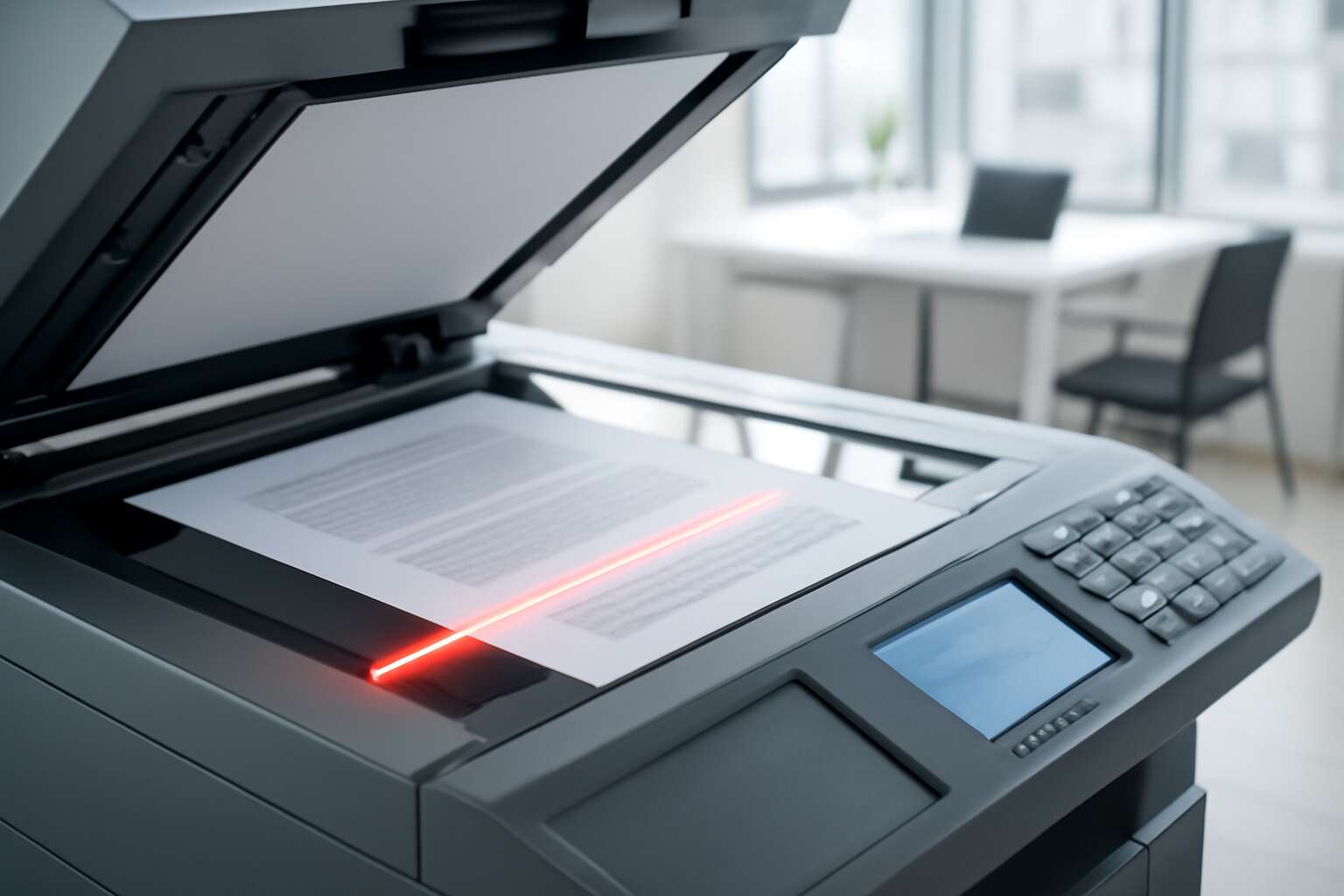
Laser-Based Copy Technology Overview
What laser copy technology is
The first copy lands with quiet certainty, a promise fulfilled in a room that hums with purpose. “Precision is the quiet trust between intention and outcome,” a seasoned engineer once told me, and that truth still lingers in the air when the laser fires. In this piece, we explore laser-based copy tech and what it means for everyday document work!
In a photocopy machine laser workflow, the focused beam writes an electrostatic latent image on a photoconductor drum, which then attracts toner and transfers it to paper. The result is crisp text, clean graphics, and predictable density across pages.
- Speed and throughput
- Consistency and detail
- Maintenance predictability
For South Africa’s offices, the appeal lies in reliability, scalable output, and simple service networks—qualities that keep teams moving when deadlines loom. The photocopy machine laser is more than an engine; it’s a trusted partner in everyday communication.
Key components of a laser copier
The quiet precision of a laser beam turns busy offices into well-tuned machines. In South Africa’s deadline-driven workplaces, the photocopy machine laser is a steady waypoint between chaos and clarity. As a seasoned engineer once said, “Precision is the quiet trust between intention and outcome,” and that trust remains when the beam fires, guiding every page with certainty.
At the heart are components that choreograph light and toner into legible reality:
- Laser unit — writes the latent image
- Photoconductor drum — holds it until toner arrives
- Toner and development — powders drawn to the pattern
- Fuser assembly — seals the page with heat and pressure
These parts drive speed, detail, and predictable density across runs, translating into consistent output from a machine that fits the rhythm of busy desks. For South Africa’s offices, service networks and scalable throughput remain the quiet productivity levers behind daily documents, cementing the laser copier as a trusted collaborator in everyday communication.
How laser copying works in practice
Precision is the quiet engine of productivity, and the photocopy machine laser is its most reliable fuel in South Africa’s deadline-driven offices. When the beam settles on a page, chaos gives way to clarity, and I see how each pass delivers repeatable density and crisp edges that colleagues trust and managers notice.
How it works in practice: a focused beam traces the image on a light-sensitive surface, toner lands where the laser has laid its shadow, and a heated roller seals the result onto paper.
- Latent image written by the laser onto a photoconductor.
- Toner attracted and transferred to the paper.
- Fusing with heat and pressure to fix the image.
Beyond parts, the real story is throughput and service: fast warm-ups, consistent density, and networks that keep this office engine purring in busy hubs.
Benefits over traditional electrostatic methods
In South Africa’s deadline-driven offices, print volumes have risen by more than 30% in the last five years, and the photocopy machine laser keeps pace with quiet precision. This is where precision meets productivity, and the pages emerge with consistently crisp edges.
Compared with traditional electrostatic methods, laser-based copy technology delivers superior density control, faster warm-ups, and rock-solid reliability in busy hubs. The result is fewer reprints, smoother tonal range, and easier maintenance—all while networks hum in seamless collaboration with devices across the floor.
- Sharper registration and predictable image density across long runs
- Quicker readiness and steady throughput during peak hours
- Better energy use and simpler service profiles in busy offices
In this blend of craft and clockwork, the machinery transforms everyday tasks into a choreography of accuracy that managers notice and operators appreciate.
Selecting a Laser Copier for Your Office
Assessing your real-world copying needs
Momentum is a currency in any South African office; a deft choice of copier can turn minutes into progress. Before signing a lease, map daily prints and copies against practical needs rather than glossy specs—your future self will thank you.
A well-chosen photocopy machine laser, a reliable partner, balances speed, yield, and quiet operation.
- Monthly duty cycle aligns with peak loads
- Paper handling, duplexing, and media sizes
- Color versus monochrome output and print quality
- Security, network integration, and admin controls
In the end, the choice tunes the office’s tempo, turning routine tasks into a smoother symphony.
Evaluating speed, duty cycle, and reliability
Every South African office knows momentum is earned, not given. On a farm bench or a city desk, the photocopy machine laser becomes more than a machine—it is a partner. Choose with care: speed, duty cycle, and reliability shape how quietly and predictably work unfolds!
Consider these facets:
- Speed, first-page-out time, and sustained throughput
- Duty cycle and monthly volume
- Reliability, maintenance cadence, and parts availability
In the end, the choice tunes the office tempo, turning routine tasks into a smoother rhythm, like a harvest bell after rain.
Selecting paper sizes, types, and finishing options
“In an office, a well-chosen sheet is a silent ally,” a South African manager might say, and the photocopy machine laser is the instrument that polishes that ally. Paper choice begins the performance; the copier waits patiently to translate texture into clarity.
When selecting for the photocopy machine laser, consider sizes that fit your workflow—A4 for most documents, A3 for spreads, and select legal stock for reports. Choose paper types by weight and finish: standard office paper (80–90 gsm) for everyday tasks, 100–120 gsm for proposals, and recycled stocks for sustainability.
- Size compatibility (A4, A3, uncommon formats)
- Weight and finish (gsm ranges, gloss or matte)
- Finishing options (folding, hole punching, stapling)
With the right paper and finish options, output steadies your day, avoiding the jarring interruptions of misfeeds and mismatched stocks.
Energy efficiency and running costs
In South Africa’s bustling offices, the energy saved on day one glitters like a cape of light. A well-chosen photocopy machine laser quietly trims running costs and keeps the workflow humming, with teams reporting up to 30% lower annual bills. When performance and prudence walk hand in hand, the office becomes a brighter arena where tasks unfold with quiet reliability.
- Sleep mode lowers idle power without delaying work
- Rapid wake-up minimizes downtime on first pages
- Smart energy management reduces phantom draw during the day
To sustain that glow, seek energy-efficient heartbeats: sleep mode lowers idle power, rapid wake-up, and smart power management that cuts phantom draw. These features let the photocopy machine laser work in harmony with the day, turning the office into a calm, confident stage.
In this mythic workshop, the machine becomes a guardian of budgets and schedules.
Connectivity, security, and user management features
In South Africa’s bustling offices, nearly 70% of document workflows hinge on a connected, secure print network. Selecting a photocopy machine laser for Your Office Connectivity, security, and user management features is the compass when stacks of work sprint toward the finish line. The right match turns routine copying into a quiet, confident partnership, where every print release feels like a whispered guarantee.
Key features to weigh:
- Connectivity across devices and platforms, with mobile and cloud printing options
- Security controls such as user authentication, data encryption, and secure print release
- User management capabilities like role-based access and audit trails
A well-tuned system preserves momentum without becoming a bottleneck, letting teams glide through tasks with calm assurance. I’ve watched it in action—teams move with that same quiet confidence.
Maintenance and Care for Laser Copiers
Regular cleaning and toner handling guidelines
The quiet glow of the photocopy machine laser hides a ritual—care that preserves fidelity and uptime. In South Africa’s bustling offices, regular cleaning and careful toner handling stand between crisp text and smoky, whisper-thin gray. A well-kept machine breathes easier, prints truer, and avoids the shadows of downtime.
Maintenance is a quiet pact: protect the surface from dust, respect the supply chain, and store consumables in appropriate conditions. For the device, the output quality is a mirror of how toner is approached—handled with respect, kept sealed, and replaced by approved cartridges.
Consider these broad care themes:
- Use only approved consumables to protect print fidelity
- Maintain a clean, dust-minimized environment around the unit
- Schedule professional servicing when performance wanes
In this quiet theater of ink and light, maintenance of the photocopy machine laser becomes a safeguard for every document you send into the world.
Preventive maintenance schedules
In South Africa’s bustling offices, the photocopy machine laser works with a patient, almost musical rhythm. A robust preventive maintenance schedule keeps it reliable, trimming downtime and maintaining sharp text even after long shifts. When kept in a stable temperature and rhythm, a quiet optimism returns to every page.
Maintenance is not dramatic; it’s a steady act of care—timely inspections, careful handling of replacement parts, and a respect for the machine’s limits. With regular checks by qualified technicians, the path from first copy to last is smooth, and the office carries on with confidence.
Environmental considerations and part replacement reminders
“Rhythm is the silent engine of productivity,” a line echoed in South Africa’s busy offices, where the photocopy machine laser keeps time with quiet precision. When housed in harmony, it delivers sharp text and steady uptime, copy after copy!
Environmental considerations shape its performance. A stable temperature, clean air, and dust-free surroundings protect the imaging path and toner quality. Energy-efficient operation eases the footprint while preserving speed. Sustainable choices—recycling cartridges and mindful disposal—help the office breathe easier.
- Maintain ambient temperature and humidity within recommended ranges.
- Keep the workspace dust-free to protect delicate components.
- Participate in toner cartridge recycling and eco-friendly waste streams.
- Enable energy-saving modes during idle periods to cut consumption.
Part replacement reminders arrive as a quiet discipline. Replacements should come through qualified technicians, with genuine parts and a concise service log. The result is a dependable, respectful performer that travels with the office and never stalls the workflow.
Troubleshooting Common Laser Copy Issues
Poor copy quality and banding or fading causes
Copy quality can sabotage a meeting faster than a PowerPoint malfunction. The moment a photocopy machine laser starts producing banding or fading, the room’s mood plummets and the CFO’s eyebrows do a dramatic arch. I’ve seen it derail a briefing more often than coffee runs, especially in South Africa’s fast-paced offices.
At the heart of poor copies are a few common culprits that quietly steal ink from your expectations. Below are frequent suspects, not solutions, just realities you’ll want to consider when diagnosing the issue.
- Worn or old toner and aging cartridges
- Drum wear or misregistration
- Paper type, weight, or moisture interacting badly with the laser
- Fuser temperature drift or roller contamination
These factors can create banding, ghosting, or fading across runs, reminding us that even a state-of-the-art laser system is only as good as its environment and consumables.
Paper jams and feed system problems
In busy South African offices, a single paper jam can derail a briefing faster than a PowerPoint crash. The feed system is usually the culprit, quietly failing at that critical moment. The photocopy machine laser seems calm, but when sheets misbehave, even seasoned teams scramble for answers.
Watch for these telltale jam signals:
- Frequent paper jams at the feed tray
- Misfeeds during sheet pickup or auto-feed operations
- Paper curl or moisture causing sheets to flutter or stick
These realities remind us that even a state-of-the-art setup is only as reliable as its environment.
Diagnostic codes and error messages interpretation
One error code can derail a briefing faster than a PowerPoint crash. In busy South African offices, the photocopy machine laser panel flickers with meaning—fast. Reading those messages correctly is the difference between a stalled workflow and a smooth run to the finish.
Interpreting diagnostic codes is about pattern, not guesswork. Here are common families you’ll encounter and what they imply:
- Paper path alerts (P-01, P-02): hint at misfeeds and sensor checkpoints along the tray and pickup area.
- Toner and imaging alerts (T-1, T-2): point to consumables or imaging unit readiness and potential drum issues.
- Fuser and temperature faults (F-10): signal overheating or slow warm-up in the fuser unit.
- System faults (E-01, E-03): cover general sensor or communication errors that halt processing.
When these messages appear, the codes guide you toward which subsystem to check, keeping downtime manageable in SA offices.
Professional service vs. self-maintenance decisions
In a busy South African office, one stubborn copy jam can ripple through the morning. The photocopy machine laser sits at the center of that workflow, and downtime compounds fast. Quick, correct decisions about service versus self-maintenance keep the day moving and protect client deadlines.
- Warranty coverage and service contracts
- Downtime cost and impact on deadlines
- In-house capability and technician availability
- Frequency and risk of recurring faults
When in doubt, weigh the scalars: cost, risk, and reliability. For this kind of laser setup, professional service brings factory-trained technicians, genuine parts, and fast fault isolation, while self-maintenance keeps expenses down in the short term—and can hide trouble behind a veneer of normal operation.

0 Comments