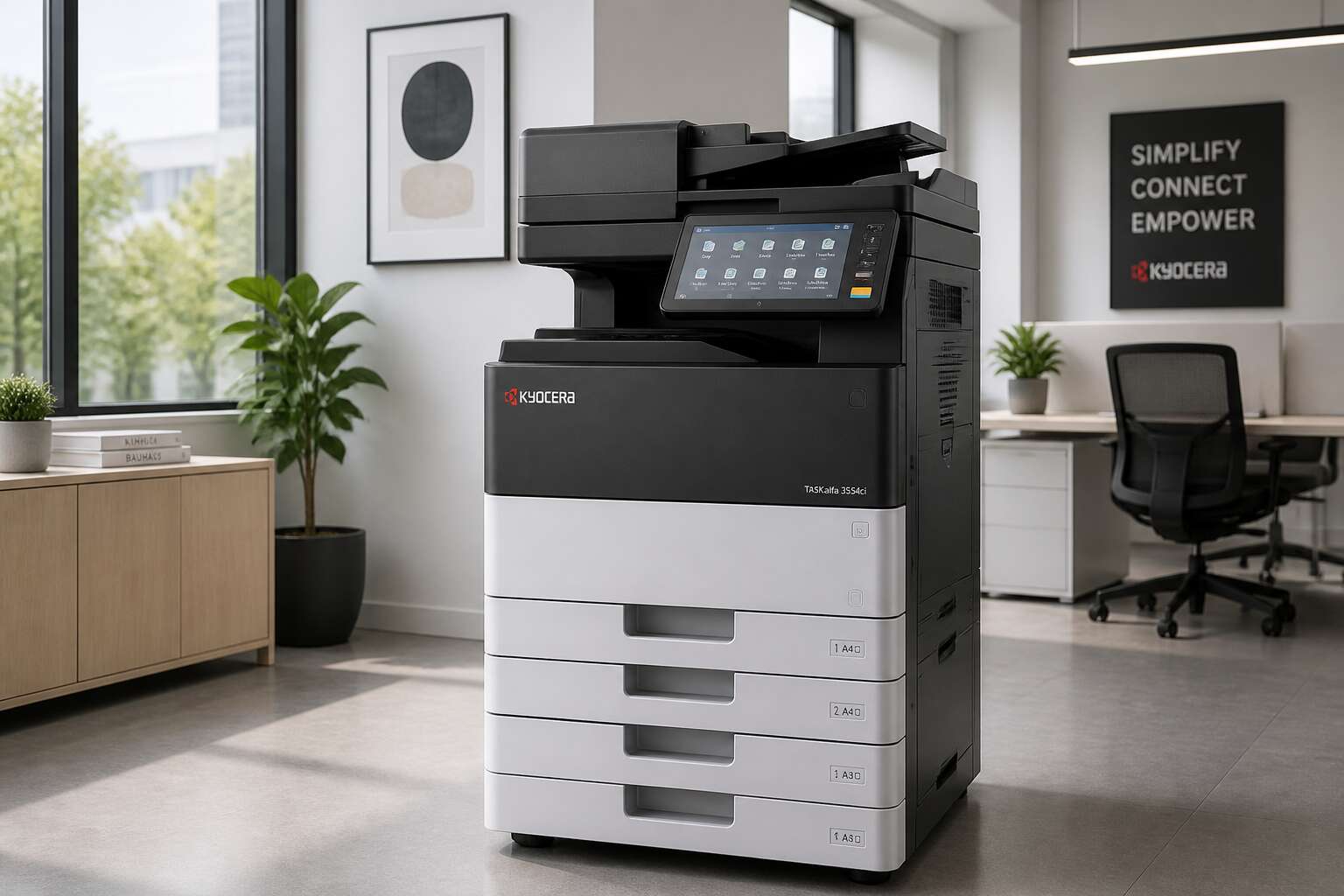
Why Kyocera Photocopy Machines Stand Out
Reputation for Unmatched Durability and Longevity
A photocopy machine Kyocera business owners choose often runs past its expected service life. Independent testing shows many models exceed 600,000 copies before major maintenance. This durability comes from rigid metal frames and a drum unit designed for long intervals. The simple paper path reduces jams and wear. For a busy Johannesburg print room, that means fewer technician visits. Consider the engineering choices:
- A long-life amorphous silicon drum
- Replaceable maintenance kits that extend the main body life
- A robust clutch system that handles heavy paper stock
These features are not marketing claims. They reflect a design philosophy focused on repairability. While other brands build planned obsolescence into their firmware, Kyocera keeps the same mechanical platform for years. You can buy a used photocopy machine Kyocera unit and still find spare parts readily. That longevity directly lowers total cost of ownership, making it a sound investment for any South African business.
Eco-Friendly Printing with Long-Life Components
Eco-friendly printing starts with smarter engineering. A photocopy machine Kyocera builds uses less power when active and when idle. The energy-saving mode is aggressive yet responsive. Toner efficiency is another win. More pages per gram of toner means fewer cartridges in the bin. Here is what stands out:
- Low melt temperature toner that uses less heat
- Shorter warm-up times, saving electricity
- Long-life components that reduce replacement frequency
This approach turns a standard office tool into a cleaner investment. It is not about recycling waste after the fact. It is about creating less waste from the start. For a business in Johannesburg or Durban, the cumulative effect on your budget and the environment is substantial. A photocopy machine Kyocera produces aligns with sustainability goals without compromising print quality. In my view, that is the right call.
Lower Total Cost of Ownership (TCO) Over Time
The true ledger of ownership seldom appears on an invoice. Industry data shows running costs outpace the purchase price within a standard lease term. A photocopy machine kyocera resists that trend through deliberate engineering. Its components operate with measured efficiency, requiring fewer interventions and less energy.
Every service interval arrives later. Every toner cartridge produces more pages. The result is a predictable expense stream that never surprises.
- Maintenance schedules stretch across longer intervals
- Replacement parts remain functional for extended cycles
- Depreciation remains gradual
Over seven years, the accumulated savings in consumables alone often equal half the initial investment. The true total cost of ownership stays visible only to those who keep running tallies. A photocopy machine kyocera makes that tally favorable.
Key Features to Look for in a Kyocera Photocopier
High-Speed Printing and High Monthly Volume Capacity
When the queue builds at the reception desk, the last thing you need is a sluggish photocopier. I have seen offices lose entire mornings to a machine that cannot keep pace. The true measure of a photocopy machine kyocera lies in its appetite for work, not its outer shell. Focus on two technical pillars: print speed and monthly volume capacity.
High-speed printing means more than raw pages per minute. It involves rapid warm-up, quick first print, and consistent output under pressure. A Kyocera with a robust engine can sustain high page rates without faltering. That saves real time!
Monthly volume capacity tells you the machine’s real endurance. This number, often called duty cycle, indicates how many pages the device can process each month without strain. For demanding environments, choose a model with a higher recommended volume to avoid breakdowns.
Consider these traits when comparing models:
– Dual-sided scanning to match fast output
– Expandable paper trays for long runs
– Network connectivity for shared office use
These features ensure the photocopy machine kyocera earns its place in a bustling workspace.
Advanced Security Protocols for Data Protection
In the quiet hum of every South African office, the photocopy machine kyocera holds data that matters. I have seen firms suffer from a single unsecured print job. The machine stores every scan, every copy, every memory.
Advanced security protocols are essential. Modern Kyocera models encrypt files on the hard drive. User authentication prevents unauthorized access. Secure print release keeps sensitive documents private until the owner arrives.
Key features to demand:
- Hard drive encryption for stored data
- User authentication for device access
- Secure print release for confidential jobs
For businesses under strict privacy laws, the photocopy machine kyocera with robust security becomes a dependable partner. Choose one that protects your data as fiercely as you protect your reputation.
Seamless Connectivity and Mobile Integration
The modern office does not live on paper alone. It thrives on movement, on instant access, on documents that travel from desk to device in moments. A photocopy machine kyocera must connect with your smartphone and your cloud storage.
I have watched offices lose hours to clunky file transfers. That delay vanishes. When a photocopy machine kyocera links directly to Google Drive or Dropbox, staff scan to email or save files to shared folders without touching a USB stick. Mobile printing from AirPrint and Android devices works without complex setup.
Key features worth checking:
- Wi-Fi and Ethernet connections for flexible placement
- NFC or QR code support for touchless printing
- Cloud integration with major platforms
- A companion app that mirrors the copier’s main functions
These capabilities turn the machine into a quiet participant in your daily workflow. Information moves, and people move with it.
Flexible Paper Handling and Finishing Options
Paper is rarely uniform in a real workspace. In any South African office, documents arrive as thick card covers, thin invoice paper, or glossy marketing sheets. A photocopy machine kyocera must handle this variety without jamming. Look for adjustable trays that accept different grammages and sizes. The right machine feeds envelopes, labels, and recycled stock with consistent ease.
Finishing options matter just as much. Stapling, hole punching, and saddle stitching transform a raw print run into a polished deliverable. A photocopy machine kyocera with integrated finishers saves hours of manual assembly. For businesses that prepare proposals, in line booklet makers reduce waste.
Key paper features to evaluate:
- Tray capacity and number of paper sources
- Support for A4, A3, and custom sizes
- Duplexing for automatic two sided printing
These options turn a simple copier into a production tool. Staff spend less time at the machine.
Understanding Kyocera’s Product Range
Compact Desktop Models for Home and Small Offices
Space in a South African home office is precious. A compact photocopy machine Kyocera offers from their desktop lineup changes that reality. These units pack essential functions into a chassis that fits between your keyboard and a filing cabinet. I have seen a two-person design studio run an entire morning on one of these machines without a jam. The control panel is intuitive, and the toner system uses a simple replaceable cartridge. For anyone starting a small business, that ease matters!
- A footprint barely larger than a sheet of A3 paper
- An automatic document feeder for quick multi page jobs
- Energy saving modes that activate after idle periods
The photocopy machine Kyocera builds here prioritises practicality. You get reliable output without needing a dedicated technical room. Place it on a sturdy desk, connect it to your Wi Fi, and it will handle your daily admin work efficiently.
Multifunction Printers (MFPs) for Growing Businesses
Growing businesses often buy their first copier, then replace it within two years. That cycle wastes money. A photocopy machine kyocera offers in its multifunction range is built to scale beyond that first stage. The product line includes A4 and A3 models, each sharing the same software platform. This means a document scanned on a desktop unit opens the same way on a floor standing machine. Employees move between departments without a learning curve. The range also includes different output speeds, but the real value lies in the user interface. Kyocera designs these panels to be clear, with a touch screen that responds to a gloved hand. For a growing business, this uniformity reduces support tickets. You focus on running the company, not on explaining how to reset a drum unit. I have seen this consistency turn a chaotic office into a calm one. That is a practical advantage you feel every week!
Production Print Solutions for Large Enterprises
In the high-volume world of enterprise printing, a photocopy machine Kyocera deploys for production environments is a different beast entirely. These are not desktop conveniences; they are engineered workhorses built for continuous output where downtime means missed deadlines. The product range focuses on modularity, letting you configure paper capacity, finishing, and connectivity to match a specific operational floor plan.
What sets production print solutions apart is the software ecosystem that manages the entire workflow. It tracks jobs, balances load across multiple devices, and provides audit trails. For a large enterprise, this translates into predictable costs and fewer surprises. A practical list of what to expect:
– High-speed monochrome and colour engines
– In-line finishing like booklet making and perfect binding
– Advanced media handling for heavy stock and banners
These machines integrate with existing enterprise resource planning systems, so a print job moves from a user’s screen to the output tray without manual intervention. The real advantage is control. You get a clear picture of every page produced, which is essential for budgeting and compliance. That is the kind of clarity a large operation needs.
Specialized Machines for Education, Healthcare, and Legal Sectors
One misfiled page can delay a court case by a month. One lost consent form can compromise a patient’s care. One unprinted exam paper can disrupt an entire school term. These stakes demand a photocopy machine Kyocera configures for specific workflows, not generic office tasks.
For education, machines handle heavy paper weights and collated exam packs. Healthcare requires secure printing to protect patient records under POPIA. Legal practices need audit trails and watermarks for discovery documents.
- Medical-grade finishing for consent forms and prescription pads
- Tamper-proof audit logs for privileged client information
- Durable paper paths for worn textbook pages and plastic lanyards
Each sector benefits from Kyocera’s customisable firmware. I have seen these machines bring order to busy admin offices. The device becomes a tool for compliance and control. That clarity matters when a single misfeed can stall a courtroom or a clinic. A photocopy machine Kyocera offers in this segment is an investment in operational certainty.
Tips for Maintaining Your Kyocera Photocopy Machine
Routine Cleaning and Daily Care Best Practices
Many office managers overlook a simple fact. Dust undermines your photocopy machine kyocera. A machine that looks clean on the outside can harbour toner residue and paper fibres internally. I have seen units fail from neglect more often than from mechanical exhaustion.
Daily care takes minutes. Wipe the platen glass each morning with a lint free cloth. Empty the waste toner bin before it reaches capacity. Remove paper dust from the feed rollers weekly.
- Clean the bypass tray guides with a dry cloth
- Check the fuser area for stray flakes
- Inspect the drum cartridge for streaks
Keep the ventilation slots unblocked. Heat is destructive. A disciplined routine extends the lifespan of the unit without costly service calls.
Effective Toner and Consumable Management
Understanding the consumables lifecycle is where most offices stumble with a photocopy machine kyocera. Toner is not a set and forget commodity. It degrades with heat and humidity. Store cartridges flat and use the oldest stock first. I have seen dusty shelves fill with expired toners, and then the machine prints faded pages despite a full cartridge.
Genuine cartridges matter. Third party options save a few rand but often disrupt the drum charge. The result is streaking and premature wear.
Here is what I check every quarter:
- Seal integrity on sealed cartridges
- Toner level readings against print output
- Drum unit lifespan and replacement intervals
Managing these variables keeps the internal architecture stable. A photocopy machine kyocera with a well fed toner system produces consistent density and fewer service interruptions.
Troubleshooting Common Paper Jams and Error Codes
Paper jams are rarely random events. Most blockages trace back to paper quality, tray alignment, or worn rollers. When a photocopy machine kyocera pulls multiple sheets, check the separation pad first. Press down on the tray guides until they lock. Remove the jammed sheet in the direction of the paper path, never against it.
Error codes often look cryptic. C00, 6500, or F000 each point to a specific component. Consult the front panel display before calling for service. A simple door switch fault can stop production for hours if ignored.
Here is a quick reference for common faults:
- Check the fuser unit for leftover debris
- Inspect the registration roller for wear
- Verify the rear access cover is fully seated
Most jams clear without tools. Those that repeat require a deeper look at the pick rollers and clutch assembly. A photocopy machine kyocera will tell you what it needs through these signals, but only when you respond quickly.
Scheduling Professional Servicing and Genuine Parts Replacement
A machine that runs for a decade is not lucky. It is maintained. For a photocopy machine kyocera, professional servicing is not a luxury. It is a requirement. Dust, paper fibres and toner residue accumulate inside the chassis. These particles wear down gears and rollers over time. A certified technician reaches components you cannot access during routine cleaning.
Scheduling service every 100,000 copies or every six months keeps the machine aligned. The technician checks torque, lubrication and electrical contacts. They also verify firmware and adjust registration.
Genuine parts matter when replacements become necessary. Aftermarket rollers or fuser sleeves may save money upfront, but they often change the machine’s timing. A photocopy machine kyocera relies on precise pressure and heat. An off-brand part can cause jams, poor fusing and shortened drum life.
Consider these points when planning maintenance:
- Track your monthly volume to schedule service accurately
- Request a written checklist from your technician
- Keep a log of replaced parts for warranty claims
Authentic components protect your investment.
Comparing Kyocera with Other Photocopier Brands
Kyocera vs. Canon vs. Ricoh: Which Is Better?
Which copier brand actually deserves your money? For South African firms, the answer depends on the job at hand. The photocopy machine kyocera range stands out for its straightforward operation and no-nonsense control panel. Canon counters with richer colour science and a wider range of photo-centric models. Ricoh focuses on automation, embedding tools that streamline repetitive tasks into existing business apps.
Consider your priorities:
- Kyocera: intuitive buttons and simple menus
- Canon: superior colour and photo handling
- Ricoh: automated document workflows
A school admin staff member may prefer the simplicity of a Kyocera. A creative studio might need Canon’s colour accuracy. An accountant buried in spreadsheets could benefit from Ricoh’s automation. None is universally better! The best fit matches your workplace culture and the technician nearby who knows that machine inside out.
Warranty Coverage and After-Sales Support
A warranty is only as good as the technician who answers the call. In South Africa, after-sales support often separates a smart purchase from a costly mistake. When comparing photocopy machine kyocera coverage with Canon or Ricoh, look at response times and parts availability. Kyocera dealers typically offer fixed-rate service contracts, while Canon relies on authorised resellers. Ricoh includes remote diagnostics as standard.
Consider these factors before signing:
1. Response time guarantee in your city
2. Stock levels of genuine consumables
3. Technician certification and training
For a small office, a basic Kyocera warranty covers parts and labour for a year. Canon counters with longer options but higher call-out fees. Ricoh bundles software updates, yet you pay for every visit. The real difference is accountability. A local Kyocera partner answers faster because they carry the full range of spares. That keeps your photocopy machine kyocera running when rivals stall.
Assessing Long-Term Running Costs and Resale Value
Comparing brands purely on purchase price misses the real picture. The photocopy machine kyocera shows its strengths when you track consumable pricing and service intervals over several years. Drum replacement cycles run longer, and genuine parts cost less than Canon or Ricoh equivalents. Those savings accumulate quietly but substantially.
Assessing a machine for long-term value involves a few key checks:
1. Price per page for toner and developer
2. Frequency of preventative maintenance
3. Strength of the second-hand market for that brand
Resale value is where Kyocera surprises people. Used units sell faster because buyers trust the build quality. A Canon might have similar specs on paper, but its depreciation curve is steeper. When the time comes to trade in, this brand returns more of your original investment. The secondary market in South Africa reflects this pattern consistently.

0 Comments